WordPress Website Quote Checklist: 7 Things to Prepare Before Hiring a Developer
Getting ready to hire a WordPress developer? This WordPress website quote checklist covers seven things to prepare before requesting a quote, including your business goals, pages, features, budget, timeline and website ownership.

Debajoyti Paul
Design Engineer
October 9, 2026
13 min read
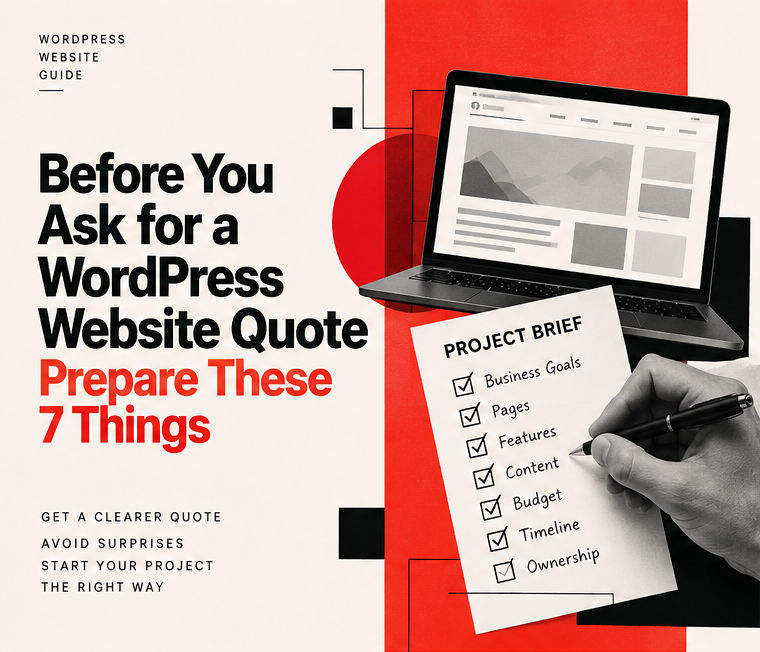
WordPress Website Quote Checklist: 7 Things to Prepare Before Hiring a Developer
You have decided that your business needs a website. Maybe you're running a local service business, opening a new shop, or finally taking an established offline business online.
Now comes the next question.
How much will the website cost?
You contact a developer, explain that you need a WordPress website, and ask for a quote.
Sounds simple enough.
But here's where things get complicated.
Two developers can look at the same request and give you completely different prices.
One might assume you need five basic pages. Another might picture a fully customised website with booking functionality, interactive elements, and several different page layouts.
Neither is necessarily wrong. They're simply working with different assumptions.
That's why I recommend preparing a WordPress website quote checklist before contacting a developer.
You don't need technical knowledge or a complicated specification document. You just need to explain what your business does, what you want the website to achieve, and what you expect from the finished product.
This guide covers seven things worth preparing before requesting a WordPress development quote.
By the end, you'll also have a simple project brief that you can copy and send to a developer.
1. Explain Your Business, Not Just the Website You Want
Let's say you contact a developer and say:
"I need a modern and professional WordPress website."
That's a reasonable starting point, but it doesn't tell the developer much about your business.
Now compare it with this:
"We run a plumbing business serving several suburbs around Melbourne. Most of our customers come through referrals. We want a website that explains our services and helps new customers request a quote."
The second description gives the developer something useful to work with.
They can begin thinking about your services, your customers, and how the website should help your business.
A plumbing company, an accounting firm, and a furniture retailer can all use WordPress, but their websites won't necessarily need the same structure.
For example, a plumbing business might prioritise phone calls and service-area pages.
An accounting firm might need detailed service information and consultation requests.
A furniture retailer could eventually need product listings and online payments.
The technology might be similar, but the business requirements are different.
What Should You Tell Your Developer?
Prepare a short description covering:
Your business name and industry
What products or services you offer
Where your business operates
Who your ideal customers are
Whether you already have a website
What you're hoping to improve
You don't need to write an entire business plan.
A few clear sentences are enough to start a meaningful discussion.
2. Decide What You Want Visitors to Do
A professional website should look good.
But appearance alone isn't the reason most businesses invest in web development.
The website needs to serve a purpose.
For a service business, that purpose might be generating enquiries.
For a restaurant, it could be helping customers view the menu and make reservations.
For a retailer, it might be allowing customers to browse products and place orders.
Before requesting a quote, decide what matters most.
Ask yourself:
When someone visits my website, what action do I want them to take?
Maybe you want them to:
Submit a contact form
Request a service quote
Call your business
Book a consultation
View your portfolio
Visit your physical location
You can have multiple actions, but choosing one primary goal helps establish a clearer website structure.
Here's an Example
Imagine you own a small construction business in Sydney.
You want a website that showcases completed projects and encourages potential customers to request a consultation.
In that case, the website may need a strong project portfolio, service pages, customer testimonials where available, and an enquiry form.
A complicated customer dashboard probably isn't necessary.
The important thing is understanding what helps someone become a customer.
What Should You Send?
Tell your developer:
Your primary website goal
One or two secondary goals
How customers currently contact you
What problems you're experiencing with your existing website
This helps ensure the proposed website supports your business rather than simply looking attractive.
3. Prepare a Rough List of Website Pages
This is one of the most useful things you can do before requesting a WordPress website quote.
You don't need to create a complete sitemap or design every page.
Just write down the pages you think your business needs.
For a typical service business, your list might look something like this:
Essential Pages
Homepage
About Us
Services
Individual Service Pages
Previous Projects
Contact Us
Additional Pages
Frequently Asked Questions
Locations We Serve
Blog or Resources
Privacy Policy
Your actual requirements might be different.
That's completely fine.
Here's Something Many Business Owners Overlook
Ten pages don't necessarily mean ten different designs.
For example, if your business offers five services, those service pages might share the same layout.
Only the content changes.
On the other hand, a portfolio page might require a completely different structure with images, project details, and interactive elements.
This distinction matters because the number of unique layouts affects development effort.
When preparing a quote, I want to understand how many pages and distinct layouts need to be built, not just the total number of URLs.
What Should You Send?
Prepare a simple page list.
If you're unsure whether a particular page is necessary, mention that.
A developer should be able to help you identify which pages are essential and which can be added later.
4. Separate Essential Features From Future Requirements
This is where a straightforward website can become much more complicated.
You initially want a contact form.
Then you remember that customers might eventually need appointment booking.
After that, you start considering customer accounts, payment collection, or a personalised dashboard.
Those are all reasonable ideas.
But they shouldn't automatically become part of your initial website.
Every additional feature introduces development work, testing requirements, and potential maintenance responsibilities.
Decide What Your Website Needs Now and What Can Wait
I recommend organising your requirements into three groups.
Must Have at Launch
These are the features your business needs for the website to fulfil its main purpose from day one.
Examples:
Contact or quote request form
Mobile-friendly pages
Editable business and service information
Clear navigation
Essential business information
Nice to Have
These features might improve the experience, but your website can still launch without them.
Examples:
Subtle animations
Advanced search or filtering
Additional landing pages
More interactive page elements
Can Be Added Later
These are features you may need as your business grows.
Examples:
Customer accounts and login systems
Advanced appointment booking
Custom customer dashboards
Complex integrations with other business systems
Why Does This Matter?
Imagine you're building a website for your accounting business.
You probably need a professional homepage, detailed service pages, and a way for potential clients to contact you.
But do you need a customer dashboard on day one?
Probably not, unless that functionality is essential to how your business operates.
Starting with the essentials helps you control development costs and avoid unnecessary complexity.
You can always plan additional features for a later phase.
What If You're Building an Online Store?
If your business needs an e-commerce website, mention that early.
A WooCommerce store requires additional planning around products, inventory, payment processing, shipping, taxes, and order management.
It's a different scope from a standard business website.
What Should You Send?
Prepare two lists:
Features required for launch and features you might want in the future.
That distinction makes estimating the work much easier.
5. Gather Your Existing Business Materials
Before a developer starts designing your website, they need something to work with.
You might already have more materials than you realise.
For example:
Your business logo
Brand colours and fonts
Product or service photographs
Existing website content
Company information
Testimonials you have permission to publish
A Figma design
Examples of websites you like
These materials help establish the direction of the project.
What If You Don't Have a Website Design?
That's not necessarily a problem.
You can share examples of websites you like and explain what appeals to you.
Maybe you like the navigation on one website.
Another might have a clean services section.
A third could have a contact form that feels straightforward.
Those references can help your developer understand your expectations.
For projects without an existing design, I can prepare an interactive browser preview as part of the agreed design process.
That means you can review how the proposed website looks and interacts before the full WordPress implementation.
It also creates an opportunity to discuss revisions while the design is still being refined.
The number of design concepts and revision rounds should always be defined in the project agreement.
Don't Forget About Website Content
Here's another important question:
Who is responsible for writing the website content?
Your developer can build the website, but accurate business information still needs to come from somewhere.
That includes service descriptions, company history, business policies, and contact information.
If you already have suitable content, the process may be simpler.
If you're starting from scratch, clarify what content assistance is included in the quote.
What Should You Send?
Gather your available materials and identify anything that's missing.
You don't need everything to be perfect before the first discussion.
6. Share a Realistic Budget and Timeline
This part can feel uncomfortable.
Some business owners avoid mentioning their budget because they're worried the developer will simply quote the highest amount available.
I understand the concern.
But a realistic budget range can help a developer recommend an approach that suits your requirements.
For example, a multi-page WordPress business website with a defined scope is very different from a custom application with user accounts, advanced booking rules, and third-party integrations.
The required effort won't be the same.
Your Budget Helps Define the Project Scope
Let's say you want a professional business website with ten pages.
You might be able to reduce complexity by using shared page layouts, focusing on essential features, and moving advanced functionality into a later phase.
But if you need a custom booking application with customer accounts, that requires a different discussion.
The goal isn't simply to make the website cheaper.
It's to invest in the features that matter most to your business.
Be Clear About Your Timeline
Instead of saying:
"I need the website as soon as possible."
Try something like:
"We're opening a new showroom in six weeks, and we'd like the website ready before the opening."
That gives the developer context.
They can assess whether the deadline is realistic and explain what needs to happen to meet it.
Remember that development timelines also depend on how quickly content, feedback, and approvals are provided.
Working With a Remote Developer
If you're based in Australia and hiring a developer internationally, clarify:
The currency used in the quote
How meetings and updates will be handled
Your preferred communication channels
Review and approval milestones
Payment terms
Launch and handover arrangements
Clear expectations help both sides work efficiently.
What Should You Send?
Provide your approximate budget, currency, preferred launch date, and any important deadlines.
7. Clarify Website Ownership and Post-Launch Support
This might not be the most exciting part of building a website.
But it's something I strongly recommend discussing before the project begins.
Who will own the domain?
Who controls the hosting account?
Will you receive WordPress administrator access?
What happens if you want another developer to work on the website later?
These questions deserve clear answers.
Domain and Hosting
Ideally, your business should maintain control of its domain registration and hosting arrangements.
If a developer helps you set them up, clarify which accounts belong to your business and how access will be transferred.
WordPress Administrator Access
You should understand what level of access you'll receive after the project is completed.
That doesn't mean every person in your organisation needs full administrator permissions.
It means your business should have an appropriate ownership and access arrangement.
Plugins and Third-Party Services
Some websites use paid plugins, external services, or licensed software.
Ask whether these are included in the development fee or require separate payments.
Also clarify how renewals will be handled.
Maintenance and Future Changes
Websites need occasional updates and maintenance.
But that doesn't automatically mean ongoing maintenance is included in your development quote.
Ask whether future changes, security updates, backups, and technical support are included or quoted separately.
If you've previously had problems accessing a website after a developer became unavailable, you may also find my article on what happens when your web developer disappears useful.
What Should You Send?
Let your developer know whether you already own a domain, have hosting, or need assistance setting things up.
Also explain whether you intend to manage the website yourself after launch.
WordPress Website Quote Checklist: Copy This Project Brief
You don't need to remember every point from this article.
Here's a simple project brief you can copy before requesting a WordPress development quote.
Business Information
Business Name:
Current Website:
Business Location:
Products or Services:
Target Customers:
Website Requirements
Main Website Goal:
Pages Required:
Essential Features:
Future Features:
Reference Websites:
Design and Content
Do You Have a Logo?
Do You Have Website Content?
Do You Have Product or Business Photos?
Do You Have an Existing Design?
Budget and Timeline
Approximate Budget:
Currency:
Preferred Launch Date:
Important Deadlines:
Domain and Hosting
Existing Domain:
Existing Hosting:
Do You Need Setup Assistance?
Other Information
Who Will Approve the Work?
Any Special Requirements?
You can leave some answers blank if you're unsure.
A useful first conversation can help clarify the remaining details.
What Should a WordPress Website Quote Include?
Once you've shared your requirements, the next step is reviewing the developer's proposal.
A useful WordPress website quote should explain what you're paying for.
Look for clarity around the following areas.
Website Scope
How many pages are included?
How many unique layouts will be designed?
Are mobile and tablet layouts included?
Design and Development
Will the developer work from an existing design?
If not, is design work included?
Will you receive an interactive preview before development is completed?
Functionality
Which features are included?
Are there any additional costs for integrations or advanced functionality?
Content
Who writes and uploads the website content?
Is content migration included if you're replacing an existing website?
Revisions
How many revision rounds are included?
What happens if you request significant changes after approving the design?
Technical SEO
Will the website include basic technical SEO foundations?
For example, appropriate page structures, crawlable links, metadata support, and mobile usability.
Remember that basic technical SEO is different from an ongoing SEO or marketing campaign.
A development quote shouldn't imply guaranteed rankings.
Hosting and Third-Party Costs
Are domain registration, hosting, paid plugins, and subscriptions included?
If not, which expenses will your business need to cover separately?
Payment and Handover
When are payments due?
What needs to be approved at each milestone?
What access and documentation will you receive when the project is finished?
If these details aren't clear, ask before accepting the proposal.
The lowest price isn't necessarily the best value when two developers are quoting different deliverables.
You Don't Need to Understand WordPress to Hire a Good Developer
You don't need to learn PHP, WordPress themes, plugins, or hosting configuration before commissioning a business website.
That's part of why you're hiring a developer.
Your responsibility is to explain what your business does, who your customers are, and what you want the website to accomplish.
A developer should help translate those requirements into a practical scope.
The process works better when both sides understand what's being built, how it will be reviewed, and what's included in the agreed price.
I work with businesses that need professional WordPress websites without unnecessary technical complexity.
My focus is on building responsive, manageable websites with clearly defined requirements and a development process that clients can follow.
If you have an existing design, I can work from it.
If you're starting with an idea, we can establish the website structure and review an interactive preview before moving further into development.
The final approach depends on the requirements and agreed project scope.
Ready to Request Your WordPress Website Quote?
If you've worked through this WordPress website quote checklist, you're already better prepared for your first development conversation.
You don't need every technical detail figured out.
You just need a clear idea of what your business needs.
Whether you're starting your first business website or replacing an existing one, I'm happy to discuss the requirements and help define a realistic development scope.
Discuss Your WordPress Website Project
Share your business goals, approximate budget, and preferred timeline, and we can start from there.
Written by
Debajoyti Paul
Freelance design engineer with 3+ years building high-converting Next.js and WordPress sites for startups and small businesses.
More about me →